
Links


How to Join a Passworded Channel
-
Open the Mumble Client Software
-
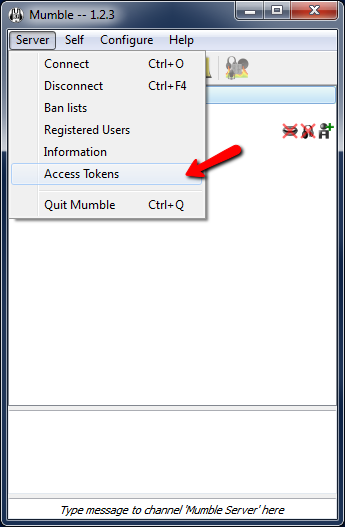
Access TokensAt top of Mumble click the "Server" menu then click "Access Tokens"
-
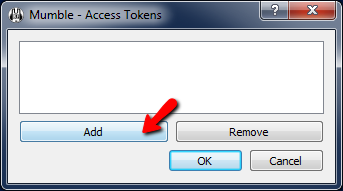
Click "Add"
-
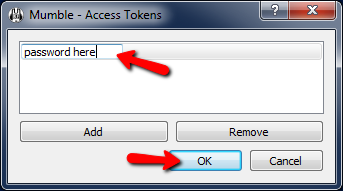
Enter Password
- Type in the channel password
- Click the "OK" button to finish
I have been overwhelmed with the level of professionalism and expertise displayed by Lightspeed and its affiliates! You guys rock! -Brian
Features
-
Server Status ScriptDisplay your server channels and connected users on your website
-
Instant SetupYou're ready to connect to your server the instant it's purchased
-
Satisfaction GuaranteedEasy cancellation, no hidden fees, and a 30-day money-back guarantee!
-
Custom HostnameGet a certified mumble.com hostname, such as wowguild.mumble.com
Account
Other Services
Contact
- 4435 Aicholtz Road, Suite 400
- Cincinnati, Ohio 45245



© 2004-2026 LightSpeed Gaming LLC
Mumble.com is owned and operated by LightSpeed Gaming, LLC and is not affiliated with the Mumble Project