
Links


Fix: A referral was returned by the server
-
Completely Uninstall MumbleWindows 7: Open Add/Remove programs and select Mumble - then click Uninstall.
-
Download the latest mumble from https://download.mumble.com/en/mumble-1.5.634.msiSave the file to your desktop or a known download folder.
-
Install MumbleInstall Mumble by double clicking the file you have downloaded. If you receive an error installing Mumble please check below:
Posted 1-15-2012:
Due to an expired certificate, the Mumble client software is required to be updated. If such an outdated Mumble is launched the error message: "A referral was returned by the server" will be displayed by Windows and Mumble will not start.
If you get the Installation Error: "This installation package could not be opened. Contact the application vendor to verify that this ia a valid Windows Installer package"
Verify the filesize is 15.0 MB
Browse to the folder where you have downloaded Mumble and click once on the file. At the bottom of the screen you should see that the file size is 15.0 MB. If the filesize is not 15.0 MB please delete the file and download the file again.
-
Traverse to the C:\Program Files\Mumble or C:\Program Files (x86)\Mumble directory on your computer.
-
Right click on mumble.exe and click 'properties'. In the Details tab you should verify the product version is correct. (Example 1.5.634) If it is correct continue else you will need to re-install mumble.
-
In the 'Digital Signatures' tab click the Signature Item in the list and push the 'Details' button. Next push the 'View Certificate' button.


-
Next click the 'Certum' Certificate and push the 'View Certificate' button. On the Certificate Information screen press the 'Install Certificate' button.


-
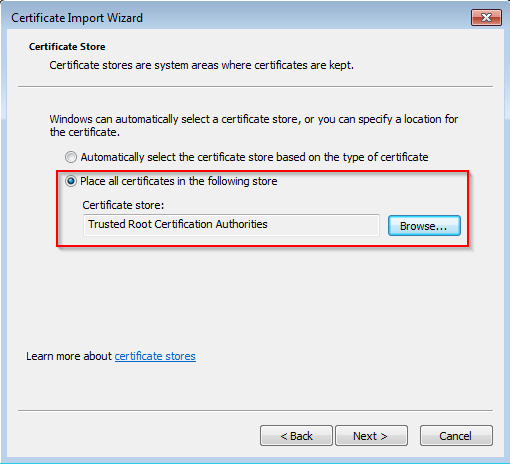
On the Certificate Import Wizard click 'Next'. Choose 'Place all certificates in the following store' and Browse to select 'Trusted Root Certifification Authorities'. Push 'Next' and 'Finish'.
-
Run Mumble as normal and enjoy.
Posted 2-13-2014:
If you are still experiencing the problem after following the above you will need to install the Certificate Authority.
I have been overwhelmed with the level of professionalism and expertise displayed by Lightspeed and its affiliates! You guys rock! -Brian
Features
-
Server Status ScriptDisplay your server channels and connected users on your website
-
Instant SetupYou're ready to connect to your server the instant it's purchased
-
Satisfaction GuaranteedEasy cancellation, no hidden fees, and a 30-day money-back guarantee!
-
Custom HostnameGet a certified mumble.com hostname, such as wowguild.mumble.com
Account



© 2004-2025 LightSpeed Gaming LLC
Mumble.com is owned and operated by LightSpeed Gaming, LLC and is not affiliated with the Mumble Project